


VE Pro 作为跨平台编曲的终端解决方案,一向是广大音乐制作人所珍藏的神器,
不仅节省了资源,还方便快捷,如今他们将该产品更新到了第八代!
更新后,VSL 在原有的 VE Pro 8 的基础上,推出了一个加入了视频功能的全新版本 VE Pro 8V!
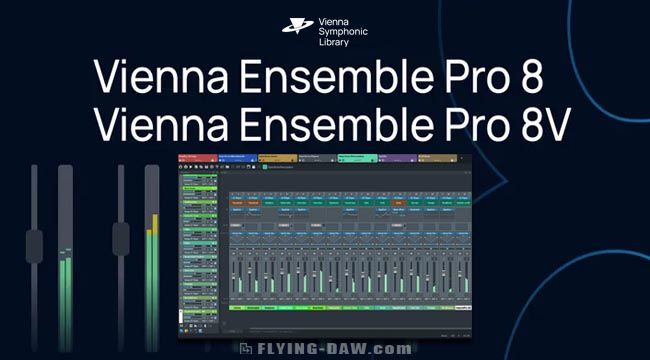
不仅节省了资源,还方便快捷,如今他们将该产品更新到了第八代!
更新后,VSL 在原有的 VE Pro 8 的基础上,推出了一个加入了视频功能的全新版本 VE Pro 8V!
Smart Connectivity. Central Control.
Vienna Ensemble Pro has long been the backbone of professional studios worldwide, connecting virtual instruments, effects, and computers into one powerful network across Macs and PCs.
With Vienna Ensemble Pro 8, this concept reaches a new level of intelligence and reliability, offering smarter server networking, faster loading times, advanced performance monitoring, crash protection, a modernized interface, new included FX plug-ins and so much more.
Whether on a single machine or across complex multi-computer setups, Vienna Ensemble Pro 8 excels as the creative hub at the heart of your studio.
智能连接,中央控制
Vienna Ensemble Pro 长期是全球专业录音棚的支柱,它将虚拟乐器、效果器和计算机连接成一个跨 Mac 和 PC 的强大网络。
借助 Vienna Ensemble Pro 8,这一理念达到了新的智能和可靠性水平,提供更智能的服务器网络、
更快的加载时间、先进的性能监控、崩溃保护、现代化的界面以及新包含的 FX 插件等更多功能。
无论是在单台机器上还是在复杂的多计算机设置中,Vienna Ensemble Pro 8 都能作为你录音棚核心的创意中心表现出色。
Overview
Cross-platform MIDI and audio LAN mixing host
Networked hosting of VST/AU plug-ins across Macs and PCs
Group Edit to sync settings of all Synchron Player instances
Integrated Synchron Stage Reverb and Vienna Suite Pro plug-ins
Create large templates quickly using Channel Sets library
Numerous studio life savers such as crash protection, preserve instances, plug-in pooling, automation mapping, activity monitor, and many more.
概览
跨平台 MIDI 与音频局域网混音宿主
支持在 Mac 与 PC 间通过网络托管 VST/AU 插件
群组编辑功能可同步所有 Synchron Player 实例的设置
集成 Synchron Stage Reverb 与 Vienna Suite Pro 插件
使用 Channel Sets 库快速创建大型模板
包含众多工作室实用功能:崩溃保护、实例保留、插件池化、自动化映射、活动监视器等。
Channels & Presets
Group Edit for all Synchron Player instances – Copy-Paste settings between Synchron Player instances, including Mixer Presets, Tuning Tables, Controller Settings.
Integrated Synchron Stage Reverb SO – convolution reverb recreating the ambience of Stage A of Vienna Synchron Stage with pre-defined positions (stereo orchestra)
通道与预设
Synchron Player 实例群组编辑功能 – 支持在多个 Synchron Player 实例间复制粘贴设置,包括混音器预设、调音表及控制器参数。
集成 Synchron Stage Reverb SO – 卷积混响效果,精准还原维也纳 Synchron Stage 录音棚 A 厅的声学环境,提供预定义声场定位(立体声管弦乐版本)。
Now includes all plug-ins from Vienna Suite Pro directly integrated in FX inserts
New Channel Sets Library – manage and insert factory or user-defined channel setups instantly.
Enhanced plug-in preset browser – lists all presets of each available plug-in.
Redesigned preset control bar – improved usability and preset management similar to Vienna Suite Pro.
新增功能
直接集成 Vienna Suite Pro 全套插件:所有效果器现已直接内置在 FX 插入槽中
全新 Channel Sets 库:可即时调用管理原厂预设或用户自定义的通道配置方案
增强版插件预设浏览器:集中展示每个可用插件的全部预设列表
重新设计的预设控制栏:优化操作逻辑,预设管理体验与 Vienna Suite Pro 保持一致
Performance & Workflow
Faster project loading – When loading project data into an instance that already contains similar plug-in configurations,
Vienna Ensemble Pro 8 intelligently reuses existing plug-ins instead of recreating or reloading them,
greatly improving load times and often reducing the need for the “Decouple” feature.
性能与工作流
更快的项目加载速度——当向已包含相似插件配置的实例中加载项目数据时,
Vienna Ensemble Pro 8 会智能复用现有插件而非重新创建或加载,
大幅提升加载效率,并降低对“解耦”功能的依赖需求。
Crash Protection – If a project file (.vep or .vesp) crashes during loading,
you can selectively disable the element that caused the crash on the next load attempt,
with the option to disable other elements as well (for example, all plug-ins of the same type).
Large templates remain accessible and editable,
preventing a single faulty plug-in from rendering an entire project unusable.
崩溃保护——若项目文件(.vep 或 .vesp)在加载过程中崩溃,
你可在下次加载尝试时选择性禁用导致崩溃的元素,
并可选禁用其他相关元素(例如,同类型的所有插件)。
大型模板仍可保持可访问和可编辑状态,
避免因单个故障插件导致整个项目无法使用。
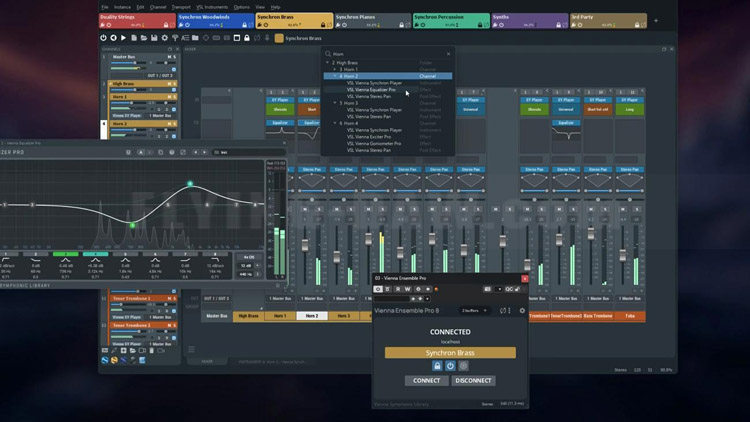
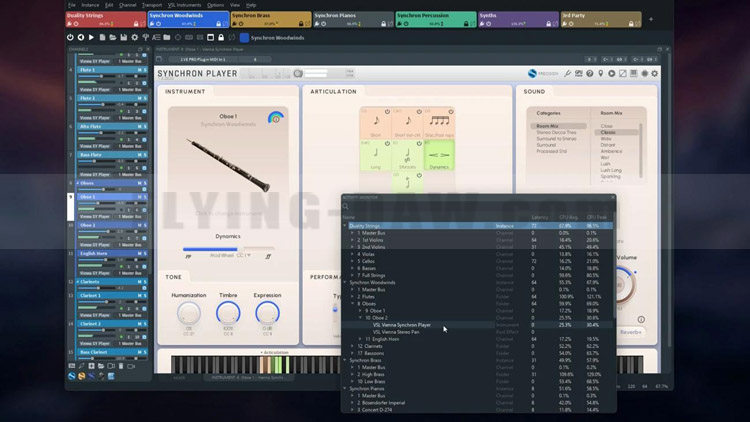
Activity Monitor – Displays a detailed, sortable overview of CPU and performance usage for each instance, channel, and plug-in, allowing you to quickly locate heavy performance hitters or plug-ins that have hung during processing.
Search function – Use Ctrl/Cmd+F to quickly find plug-ins, channels, or parameters within an instance and Ctrl/Cmd+Shift+F across the entire server.
Undo/Redo History – track and revert changes directly from the Edit menu.
活动监视器 – 显示每个实例、通道及插件的 CPU 与性能使用情况的详细可排序概览,助你快速定位高负载项或处理过程中卡住的插件。
搜索功能 – 使用 Ctrl/Cmd+F 在实例内快速查找插件、通道或参数;使用 Ctrl/Cmd+Shift+F 在整个服务器范围内进行搜索。
撤销/重做历史 – 直接通过编辑菜单跟踪和还原更改
Performance & Workflow
Faster project loading – When loading project data into an instance that already contains similar plug-in configurations,
Vienna Ensemble Pro 8 intelligently reuses existing plug-ins instead of recreating or reloading them,
greatly improving load times and often reducing the need for the “Decouple” feature.
性能与工作流
更快的项目加载 – 当将项目数据加载到已包含类似插件配置的实例中时,
Vienna Ensemble Pro 8 会智能复用现有插件而非重新创建或加载,
显著提升加载速度,并减少对“Decouple”功能的依赖。
Crash Protection – If a project file (.vep or .vesp) crashes during loading,
you can selectively disable the element that caused the crash on the next load attempt, with the option to disable other elements as well (for example, all plug-ins of the same type).
Large templates remain accessible and editable, preventing a single faulty plug-in from rendering an entire project unusable.
崩溃保护 – 如果项目文件(.vep 或 .vesp)在加载过程中崩溃,
你可在下次加载时选择性禁用导致故障的元素,并可选禁用其他相关元素(如全部同类型插件)。
大型模板仍保持可访问和可编辑状态,避免因单一故障插件导致整个项目不可用。
Networking & Connectivity
Servers are now identified by name instead of IP address – no need for static IPs.
Automatic connection by Server Name for seamless template switching between machines.
New “Accept new connections” option in Server Preferences for better control while switching host projects.
Improved reliability of server discovery (no longer dependent on Bonjour).
Major GUI refresh – modernized, more responsive, and easier to navigate.
OSC interface fully documented
网络与连接性
服务器现通过名称识别而非IP地址——无需静态IP
支持通过服务器名称自动连接,实现跨机器无缝模板切换
服务器偏好设置中新增"接受新连接"选项,便于切换宿主项目时更好控制连接
提升服务器发现可靠性(不再依赖 Bonjour)
图形界面重大革新——更现代化、响应更迅捷、导航更便捷
OSC接口完全文档化
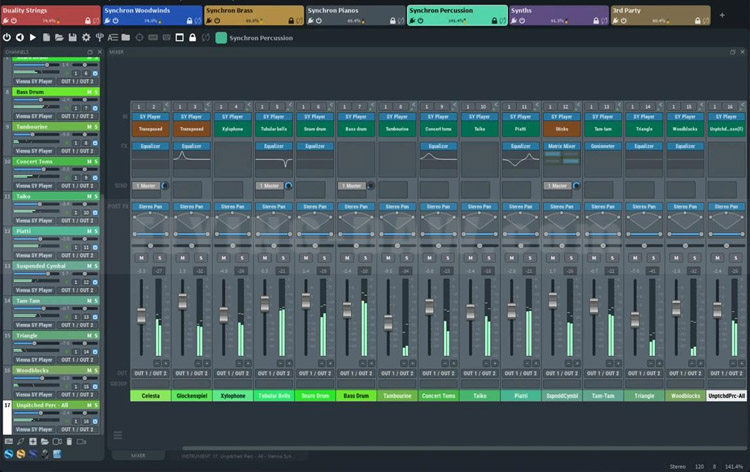
Connectivity
Cross-platform MIDI and audio LAN solution for Macs and PCs.
No audio interfaces, no MIDI interfaces on your additional networked computers – All you need is Ethernet with a Gigabit connection.
AU/VST/VST3 (Mac) and VST/VST3 (PC) hosting – Instantiate any VSL and 3rd party VST and AU plug-ins (works with nearly all available VST/AU plug-ins and supports multiple outputs).
VST3/AAX Native/MAS connector plug-ins – Supports up to 48 MIDI ports and 768 audio ports per instance.
VST hosting on the Mac, allowing for full compatibility with Windows
Audio input plug-in – Route audio signals from your DAW into Vienna Ensemble Pro, e.g., to turn it into a virtual FX rack on your networked computer.
AU/AU3/VST/VST3/AAX Native/MAS plug-in or stand-alone.
连接性
适用于 Mac 与 PC 的跨平台 MIDI 与音频局域网解决方案。
无需在额外联网计算机上配置音频接口或 MIDI 接口——仅需千兆以太网连接。
支持 AU/VST/VST3(Mac)与 VST/VST3(PC)插件托管——可实例化任意 VSL 及第三方 VST/AU 插件(兼容几乎所有可用 VST/AU 插件并支持多输出)。
VST3/AAX Native/MAS 连接器插件——每个实例最高支持 48 个 MIDI 端口与 768 个音频端口。
Mac 端 VST 托管——实现与 Windows 系统的完全兼容。
音频输入插件——可将 DAW 的音频信号路由至 Vienna Ensemble Pro,例如将其转变为联网计算机上的虚拟效果器机架。
支持 AU/AU3/VST/VST3/AAX Native/MAS 插件或独立运行模式。
Core Features
Preserve Instance – Disconnect Vienna Ensemble Pro from your sequencer while keeping all of your instruments and samples loaded, and re-connect to a new cue or project without loading again.
Full surround support up to 7.1 with integrated plug-ins for surround-to-surround balancing and mono/stereo-to-surround.
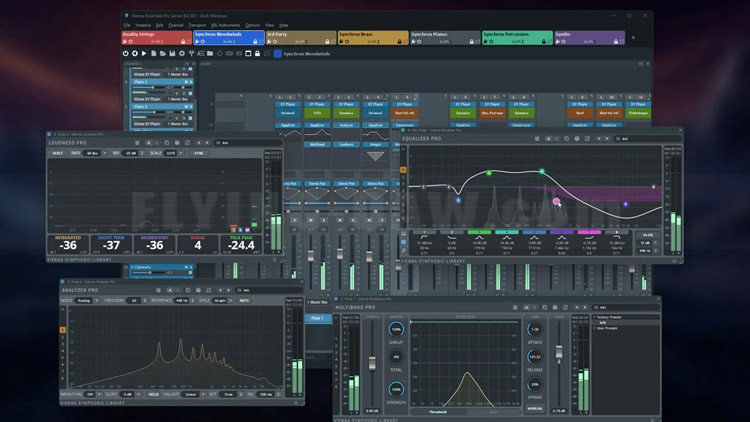
UPDATE: FX Plug-ins – All Vienna Suite Pro plug-ins, with convenient GUI displays embedded in the mixer channel view: Compressor Pro, Equalizer Pro, Exciter Pro, Limiter Pro, Analyzer Pro, Hybrid Reverb Pro
Frozen/Disabled channels allow unloading all plug-ins (including their allocated memory) from a selected channel, while keeping data intact
Faster saving times – Instance data is compressed/decompressed to increase saving speed with demanding plug-ins like NI Kontakt.
Plug-in latency compensation ensures full sync of all plug-ins inside each Vienna Ensemble Pro instance.
核心功能
实例保留 – 可在断开 Vienna Ensemble Pro 与音序器的连接时,保持所有乐器与采样处于加载状态,并在重新连接到新提示轨或项目时无需再次加载。
完整环绕声支持 – 最高支持 7.1 环绕声,配备集成插件用于环绕声到环绕声的平衡以及单声道/立体声到环绕声的转换。
更新:FX 插件 – 包含所有 Vienna Suite Pro 插件,其便捷的 GUI 界面嵌入在混音器通道视图中:
Compressor Pro、Equalizer Pro、Exciter Pro、Limiter Pro、Analyzer Pro、Hybrid Reverb Pro。
冻结/禁用通道 – 允许从选定通道卸载所有插件(包括其分配的内存),同时保持数据完整。
更快的保存时间 – 实例数据经过压缩/解压缩处理,可提升使用 NI Kontakt 等高性能插件时的保存速度。
插件延迟补偿 – 确保每个 Vienna Ensemble Pro 实例内的所有插件完全同步。
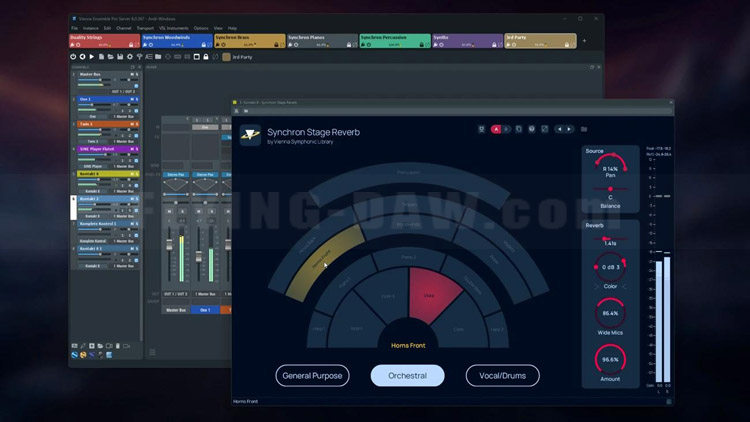
Simplified Automation – Detailed clear names of all automatable parameters available in Vienna Ensemble Pro and all inserted plug-ins.
Extended with Channel Sets in Vienna Ensemble Pro 8: Channel grouping allows assigning channels to a group, with option to link selected parameters to the entire group
Favorites Manager – Create a list of your go-to plug-ins (FX/instruments)
Favorites (auto-populated) – Always see your recently most used plug-ins on top of your plug-in list
Customize plug-in use in the Vienna Ensemble Pro Preferences
Improved plug-in scanning for a smoother experience with troublesome or incompatible plug-ins
Combined now: Instance & Folder disabling (automatable)
Copy/paste channels – For flexible template adaptations (Comm. C/V, Ctrl C/V)
简化自动化 – 提供 Vienna Ensemble Pro 及所有插入插件中可自动化参数的详细清晰命名。
Vienna Ensemble Pro 8 中通过 Channel Sets 扩展功能:通道分组允许将通道分配至群组,并可选择将特定参数链接至整个群组。
收藏管理器 – 创建常用插件(效果器/乐器)的个性化列表。
收藏功能(自动加入) – 最近频繁使用的插件将始终显示在插件列表顶部。
在 Vienna Ensemble Pro 偏好设置中自定义插件使用方式。
改进的插件扫描机制 – 提升对异常或兼容性问题的插件处理体验。
新增整合功能:支持实例与文件夹的禁用(可自动化控制)。
通道复制/粘贴 – 通过快捷键(Command+C/V 或 Ctrl+C/V)实现灵活的模板适配。
GUI Features
Extended with new Activity Monitor in Vienna Ensemble Pro 8: Instance CPU Usage – Realtime read-out of the specific CPU load
Instance MIDI/Audio activity – Better overview, easy to observe and to control MIDI and audio activity
Vertical Instance List – For a quicker overview of all available instances (in addition to the tabbed view)
Articulation Display – The currently playing articulation is displayed directly in the channel (works for Vienna Synchron Player, Vienna Instruments Pro Player).
Missing Patches are indicated by a red frame (works for Vienna Synchron Player, Vienna Instruments Pro Player).
FX Mini GUI Displays – Watch some of your integrated FX plug-ins right in the channel view.
GUI 功能
Vienna Ensemble Pro 8 新增活动监视器扩展功能:实例 CPU 使用率 – 实时显示具体 CPU 负载读数
实例 MIDI/音频活动状态 – 更清晰的整体视图,便于观察和控制 MIDI 与音频活动
垂直实例列表 – 提供除标签视图外更快捷的所有可用实例总览
演奏技法显示 – 当前演奏的音符技法直接显示在通道中(适用于 Vienna Synchron Player、Vienna Instruments Pro Player)。
缺失音色提示 – 通过红色边框标注缺失音色(适用于 Vienna Synchron Player、Vienna Instruments Pro Player)。
效果器迷你 GUI 显示 – 可在通道视图中直接查看部分集成效果器插件的状态。
Licence Information
Vienna Ensemble Pro 8 and Vienna Ensemble Pro 8V are separate products.
You don’t need Vienna Ensemble Pro 8 in order to use Vienna Ensemble Pro 8V.
If you purchase a license for Vienna Ensemble Pro 8V, you can get Vienna Ensemble Pro 8 (in the same order or later) at the reduced “Additional License” price.
许可证信息
Vienna Ensemble Pro 8 与 Vienna Ensemble Pro 8V 为独立产品。
使用 Vienna Ensemble Pro 8V 无需预先拥有 Vienna Ensemble Pro 8。
若你已购买 Vienna Ensemble Pro 8V 许可证,后续在同一订单或单独订单中增购 Vienna Ensemble Pro 8 时可享受“附加许可证”优惠价格。
Minimum:
Windows 10 (latest update, 64-bit), Intel Core i3
macOS 11 Big Sur (latest update), Intel Core i3
Working Gigabit connection between master and networked computer(s). Also works on a one-computer setup.
iLok Account and iLok License Manager software for license activation on a physical iLok 2/iLok 3 key or in an iLok Cloud Session (the iLok Cloud requires a constant internet connection!)
Recommended:
Windows 11 (latest updates, 64-bit), Intel Core i5/i7/i9/Xeon
macOS 14 Sonoma (or higher), Intel Core i7/i9/Xeon/Apple Silicon (M-Series)
Fast separate hard drive (7200 rpm or faster)
Supported plugin formats: AU/VST/VST3/AAX Native/MAS
最低系统要求:
Windows:Windows 10(最新更新,64位),Intel Core i3 处理器
macOS:macOS 11 Big Sur(最新更新),Intel Core i3 处理器
网络连接:主计算机与联网计算机间需具备可用的千兆网络连接(单机设置同样支持)
授权管理:需 iLok 账户及 iLok License Manager 软件,支持 iLok 2/iLok 3 加密狗或 iLok 云端激活(云端授权需保持持续网络连接)
推荐配置:
Windows:Windows 11(最新更新,64 位),Intel Core i5/i7/i9/Xeon 处理器
macOS:macOS 14 Sonoma(或更高版本),Intel Core i7/i9/Xeon 或 Apple Silicon(M 系列)处理器
存储:高速独立硬盘(7200 rpm 或更高)
支持的插件格式:AU/VST/VST3/AAX Native/MAS
VE Pro 8V 介绍
One Hub for Music and Picture
Designed as the central hub of modern music production, Vienna Ensemble Pro 8V brings instruments, effects, computers, and now even video playback together in one intelligent environment.
With faster loading times, smarter server networking, advanced performance monitoring, crash protection, and a host of FX plug-ins,
even the largest templates remain responsive and reliable.
Integrated Vienna Video Pro extends your setup with smooth, GPU-accelerated video streaming on remote machines, complete with timelines, markers, and flexible sync options.
Whether you’re working on a single system or across complex multi-computer studios, Vienna Ensemble Pro 8V keeps your entire creative workflow perfectly in sync.
音乐与画面的统一中枢
专为现代音乐制作核心中枢设计的 Vienna Ensemble Pro 8V,将乐器、效果器、计算机,乃至视频播放功能整合于同一智能环境。
凭借更快的加载速度、更智能的服务器组网、先进的性能监控、崩溃防护以及一系列效果插件,
即使最庞大的工程模板也能保持响应迅捷、运行可靠。
集成式 Vienna Video Pro 通过流畅的 GPU 加速远程视频流扩展你的系统,配备完整的时间线、标记点及灵活的同步选项。
无论你在单一系统上工作,还是跨复杂多计算机工作室协作,Vienna Ensemble Pro 8V 都能确保你的整个创意流程完美同步。
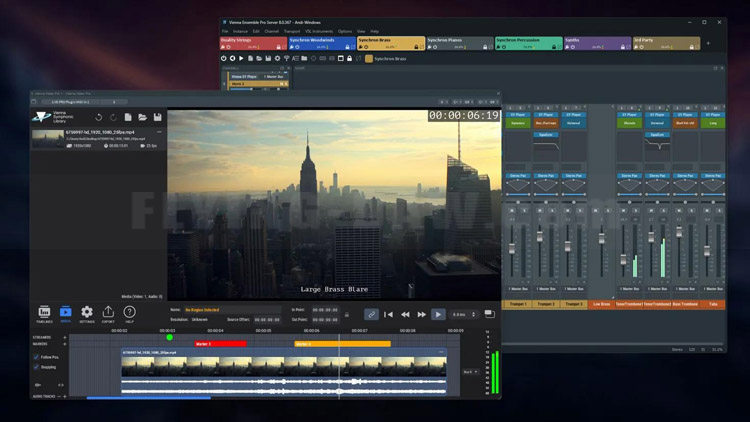
Overview
Cross-platform MIDI and audio LAN mixing host
Networked hosting of VST/AU plug-ins across Macs and PCs\
Integrated video playback over network
All features of Vienna Ensemble Pro 8
概览
跨平台 MIDI 与音频局域网混音宿主
支持在 Mac 与 PC 间通过网络托管 VST/AU 插件
集成基于网络的视频播放功能
包含 Vienna Ensemble Pro 8 的全部特性
Vienna Video Pro
Stream video and audio playback directly through Vienna Ensemble Pro 8V (also from remote machines) to free up your DAW machine’s CPU
Fluid, GPU-accelerated performance with thumbnails and audio waveforms generated in real time.
Support for multiple timelines, each with its own frame rate.
Add streamers and markers directly within the timeline for precise scoring cues.
Sync to host application or play independently in free render.
Convenient video export option – multiple resolutions and bitrates, H264 container, mp4. Keep working during export.
Load/save complete video projects within Video Pro.
Extremely low CPU impact – heavy processing is done on the GPU.
Option to delay video audio playback for perfect sync with picture.
Timeline timecode offset support, including negative values for full compatibility with Cubase and other DAWs.
Blackmagic Design support.
MMC/MTC support.
Supports virtually all common video formats.
Vienna Video Pro
通过 Vienna Ensemble Pro 8V 直接流式传输视频与音频播放(支持远程机器),释放你 DAW 主机的 CPU 资源。
流畅的 GPU 加速性能,实时生成缩略图与音频波形。
支持多时间线,每条时间线可独立设置帧率。
在时间线内直接添加流媒体标记与标记点,实现精确配乐提示。
与宿主应用程序同步,或独立自由渲染播放。
便捷的视频导出选项——支持多种分辨率与比特率、H264 容器、mp4 格式。导出期间可继续工作。
在 Video Pro 内加载/保存完整视频项目。
CPU 占用极低——繁重处理由 GPU 完成。
可选视频音频播放延迟,实现与画面的完美同步。
支持时间线时间码偏移(含负值),与 Cubase 及其他 DAW 完全兼容。
支持 Blackmagic Design。
支持 MMC/MTC。
支持几乎所有常见视频格式。
Licensing for Multiple Computers
You need one Vienna Ensemble Pro 8 license per computer.
For example, if you have two computers, one main and one secondary machine, you need just one license if you’re running one or more instances of Vienna Ensemble Pro 8 on your secondary computer only.
If you’re running one or more instances of Vienna Ensemble Pro on both your main and secondary machine, you need two licenses.
多计算机许可授权
每台计算机需单独购买 Vienna Ensemble Pro 8 授权。
例如:若你拥有两台计算机(一台主机、一台从机),仅在从机上运行一个或多个 VE Pro 8 实例时,仅需一个授权。
若在主机与从机同时运行一个或多个 VE Pro 实例,则需两个独立授权。
官方网址:
https://www.vsl.co.at/products/software/vienna-ensemble-pro-8
产品价格:
VE Pro 8 官网正价 199 欧元,3月2日前首发促销 149 欧元,
VE Pro 8V 官网正价 399 欧元,3月2日前首发促销 299 欧元,
对于拥有之前老版本 VE Pro 的用户,可以升级,详情如下:
中国区的用户请在总代理飞来音电脑音乐技术购买。